Profit AI trading signals bot
- 4.6
- Rating
- 100.00K
- Installs
- Free
- Price
 Analysis by App-foxy
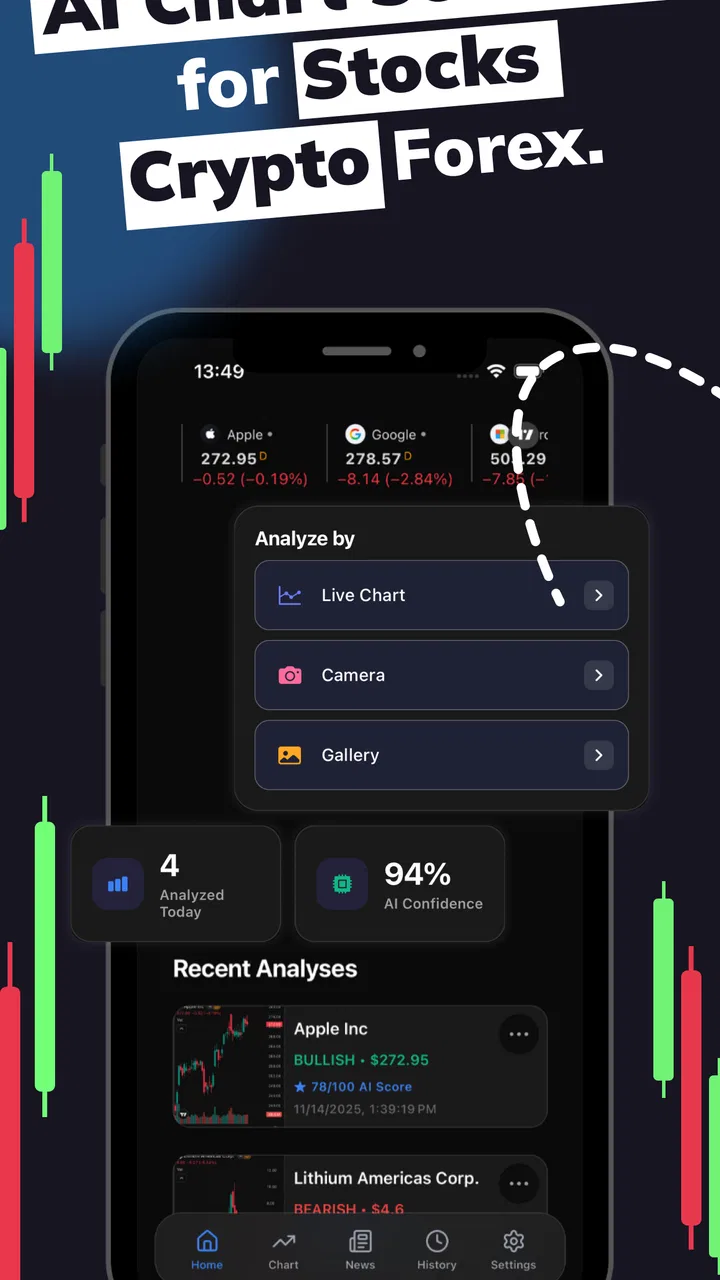
I approached Profit AI as a practical finance app rather than a magic shortcut to better trades. Its focus is AI-assisted chart analysis for stocks, forex, and crypto, which makes it most interesting for people who already look at price charts and want another way to organize what they see. My experience was that the app feels built for quick decisions: open a chart, study the analysis, compare it with your own reading, and decide whether the setup deserves more attention.
That distinction matters. A trading signals bot can help reduce the time spent scanning charts, but it cannot remove market risk or turn an uncertain setup into a guaranteed result. I found Profit AI more useful as a second opinion than as an automatic replacement for research. If you treat every signal as an instruction, you are likely to use it badly. If you use it to challenge your assumptions and create a repeatable review routine, it has a clearer purpose.
How Profit AI feels during everyday chart work
The app comes from SwiftSoft Apps and sits in the finance category. It is free to install, with optional in-app purchases ranging from $3.99 to $29.99 per item. That makes it easy to try without committing money immediately, although anyone considering paid tools should first decide whether the analysis genuinely improves their process rather than simply adding more information.
You May Also Like

 Blood Strike: 2.5 Anniversary
Blood Strike’s Loadouts Turn Every Drop Into a Tactical Gamble
A close look at Blood Strike’s custom loadouts: how fast access to signature weapons reshapes its battle royale rhythm, rewards preparation, and narrows the gap between fights.

 Pandora - Music & Podcasts
Pandora’s Music Is Easy to Start, but Harder to Recover
Pandora’s strength is its low-effort path from a seed to a station. Its weak spot is how much confidence it asks you to place in connection, setup, and quiet recovery.

 8 Ball Pool
 Is Built on Rivalries, Rematches, and Routine
A close look at the rivalries, rematches, shared routines, and unanswered safety questions that turn a quick pool match into a persistent mobile community.

 Samsung Music
’s Quiet Strength Is Playing What You Already Own
Its reach comes less from spectacle than from dependable access to a personal library. That simplicity is both the app’s strongest retention engine and its ceiling.

 AccuWeather: Weather Radar
AccuWeather Review: A Quick, Clear Forecast for Everyday Decisions
For everyday plans, the best forecast is the one you can understand quickly. AccuWeather makes rain timing, radar, and local conditions easy to act on, with a few trade-offs.

 Hill Climb Racing
Why Hill Climb Racing Still Turns Crashes Into One More Run
A tiny car, a bumpy hill and one more upgrade: Hill Climb Racing keeps resurfacing because its simple chaos makes every near-miss feel personal.
More From Our News Desk



The first thing I noticed about this kind of workflow is the emphasis on speed of interpretation. Instead of opening several unrelated resources and manually comparing chart patterns, I could use the app as a focused checkpoint. That is particularly convenient when I wanted to inspect a market during a short break, revisit a watchlist idea, or check whether my first impression of a chart was too optimistic.
Perceived speed is not only about how quickly an app opens. It is also about how quickly it helps me reach a useful conclusion. Profit AI has a straightforward role: provide chart-oriented analysis so I can spend less time staring at the same price movement without a plan. The benefit is strongest when I arrive with a question, such as whether a trend looks extended or whether a possible entry deserves further research.
I would not use it as a substitute for a full trading platform. A dedicated broker or market terminal is usually better for placing orders, managing positions, checking account details, and handling execution. Profit AI makes more sense beside those tools. Its value is in the analysis stage, not in pretending that chart interpretation and trade execution are the same task.
When the app feels quickest
The most efficient use case is a short, deliberate review. I would select one market, look at the chart analysis, write down what the app appears to suggest, and then compare that view with my own reasoning. This keeps the app from becoming a stream of disconnected signals. It also makes the output easier to judge because I can ask whether it helped me make a clearer decision.
A realistic everyday scenario would be checking a currency pair before work. I might already have noticed a movement the previous evening, so I would use the app to revisit the chart rather than begin with a completely open-ended search. If the analysis supports my idea, I still need to verify the broader context. If it disagrees, that disagreement is useful because it forces me to slow down instead of acting on an untested hunch.
For crypto users, the same routine can be helpful when markets feel especially noisy. Rapid price movement can make a quick glance feel persuasive even when the setup is weak. Using Profit AI as a pause between noticing a move and reacting to it is, in my view, more sensible than treating a signal as an urgent command.
What happens during heavier use
Finance apps become more demanding when I ask them to support repeated checking across different markets. Moving from a single chart to stocks, forex, and crypto can make the workflow feel busier, even if each individual review is simple. The main challenge is not necessarily the device; it is keeping the analysis organized enough that I do not confuse one market’s conditions with another’s.
My practical tip is to separate observation from action. First, record what the chart appears to show. Next, note why the signal might be wrong. Only after that should I consider whether the idea fits my own rules. This three-step habit is more valuable than rapidly refreshing the app, because frequent checking can encourage impulsive decisions and make normal market noise feel important.
Another useful trade-off is breadth versus depth. Profit AI’s coverage of several asset types is convenient, but a person who follows many markets at once may gain less from each individual analysis. I would rather examine a small group of instruments carefully than collect a long list of signals that I cannot evaluate. The app is easier to use well when I limit the number of questions I bring to it.
Heavy use also exposes the difference between analysis and confirmation. If I only open the app after deciding what I want to believe, I may interpret its output selectively. A better workflow is to write down my initial view before checking the analysis. That creates a simple record of whether the tool changed my thinking or merely gave me confidence.
Stability and recovery in a real routine
For a finance tool, reliability means more than staying open. I also want a clear, repeatable experience when I return later, switch between markets, or need to reassess an earlier idea. Profit AI is easiest to trust when I use it consistently and avoid treating one moment of analysis as a permanent answer. Market conditions change, so a previously useful signal should not be carried forward without another review.
I recommend building a recovery habit around the app. If I am interrupted halfway through a chart review, I would restart from the instrument and question I was examining instead of assuming that the unfinished thought is still valid. If the market has moved significantly by the time I return, the right response is to reassess the setup, not to chase the original idea simply because I already spent time on it.
This is also where the app’s limitations become important. AI analysis can make a chart feel more understandable, but clarity is not the same as certainty. A polished interpretation may still be wrong, especially when an unexpected event changes market behavior. I would never let the app’s confidence, wording, or convenience replace position sizing, risk limits, and independent judgment.
Profit AI is therefore more reliable as a process aid than as a prediction machine. It can help me apply the same questions to different charts, but I remain responsible for checking whether the situation has changed. That is a healthier expectation than asking the application to guarantee an outcome.
Device demands and who should be careful
The minimum operating-system requirement is Android 7.0, so the app is aimed at a broad range of Android devices. That does not mean every older phone will feel equally comfortable during extended chart work. Screen size, available memory, battery condition, and the general age of the device can all affect how pleasant it is to compare information or move between views.
On a smaller or older phone, I would keep sessions focused and avoid trying to monitor several ideas at once. A compact screen makes it easier to overlook context, and that is a serious weakness when the whole point of using analysis is to make a more informed decision. A larger display or tablet may be preferable for people who study charts for longer periods, while a phone remains convenient for brief checks.
Resource demands are also about attention. Even if the application itself feels light, repeatedly checking markets can consume battery, time, and concentration. I would not leave it running as a constant background companion. Opening it with a specific task is more efficient and reduces the temptation to react to every movement.
People using very old hardware should also be realistic about recovery. If an app needs to reload after being left in the background, that is less frustrating when I have already noted the instrument and the reason for checking it. Keeping a short external trading journal is useful here, not because the app is difficult, but because financial decisions should not depend on remembering a fleeting screen.
How it compares with ordinary alternatives
The usual alternative is a broker’s built-in charting area. That option is often more convenient for users who want analysis and order placement in one place. It may be the better choice if I already have a disciplined charting routine and do not want to move between applications. Profit AI is more appealing when I want a separate analytical perspective rather than another execution screen.
Another alternative is manual chart study through a general market platform. Manual work gives me more control over what I inspect and how I interpret it, but it also requires more time and consistency. Profit AI can shorten the first pass, especially for someone who is still developing a repeatable review method. The trade-off is that convenience may encourage me to accept an interpretation without understanding its limits.
Human discussion is a third alternative, whether that means reading market commentary or comparing ideas with experienced traders. That can add context that chart analysis alone may miss, but it can also introduce other people’s biases. I see Profit AI as useful when it helps me form questions before reading commentary, rather than when it becomes another source of opinions to follow blindly.
For a beginner, the best option may be a combination: use the app to learn how signals affect a chart review, use a reputable platform to understand execution and risk, and keep a journal of decisions. For an advanced trader who already has established indicators and rules, the app is worth trying only if its analysis adds a genuinely different perspective. Otherwise, it may create duplication rather than value.
Practical ways to get more from the analysis
My first recommendation is to create a fixed checklist before opening the app. I would note the market, the time horizon I care about, the reason it caught my attention, and the condition that would invalidate my idea. This prevents the analysis from becoming a vague search for something that supports an impulse.
Second, compare the app’s conclusion with a deliberately opposing view. If the chart looks bullish to me, I would ask what evidence would make that interpretation weak. If Profit AI points in the same direction, I still want to know whether the agreement comes from meaningful context or simply from looking at the same recent movement. This small act of disagreement is one of the most useful ways to avoid confirmation bias.
Third, separate a signal from a complete plan. A signal may help identify a possible direction, but a plan also needs an entry condition, an exit idea, and a limit on acceptable loss. Profit AI should occupy only one part of that process. Anyone who expects the app to supply the entire decision framework may find it too limited, while someone who already has rules can use it more responsibly.
Finally, review results by process rather than by one successful or unsuccessful trade. A good decision can lose money, and a careless decision can happen to work. I would judge the app by whether it helped me follow my rules, notice an overlooked possibility, or avoid an impulsive action. That is a more honest measure than assuming every correct-looking signal must lead to profit.
Who will appreciate it, and who should skip it
Profit AI is a good fit for curious investors and traders who already understand that markets are uncertain and want a faster way to examine charts. It may also suit people who follow more than one asset class and prefer having a dedicated analysis tool alongside their normal trading setup. The free entry point makes experimentation easier, while the optional purchases mean I would test the everyday value before paying for anything.
I would be cautious about recommending it to someone who has never learned basic risk management. A new user may mistake an AI-generated interpretation for personalized financial advice, especially when the app’s purpose is presented in a compact, signal-oriented format. Beginners should first learn what a chart can and cannot show, then use the application as an educational aid rather than a decision authority.
It is also not the right choice for someone seeking guaranteed returns, fully automated trading, or a replacement for a broker. Likewise, a trader who needs advanced execution controls, extensive research tools, or a complete portfolio-management environment may be better served by a specialized platform. Profit AI’s strength is narrower: it helps bring an AI perspective to chart analysis across stocks, forex, and crypto.
My performance verdict
Profit AI feels most valuable when I use it briefly, with a clear question and a written reason for checking a chart. Its perceived speed comes from reducing the first layer of analysis, not from eliminating the work that follows. I would describe its stability in practical terms: it can support a repeatable review routine, provided I do not expect a single signal to remain valid after market conditions change.
The Android requirement of 7.0 keeps it accessible to many users, although older phones and small screens may make longer sessions less comfortable. Resource use should be judged alongside attention and battery habits, not only by whether the application opens quickly. Focused sessions are more useful than leaving a finance app open and reacting constantly.
The app has earned a 4.6 average from around fourteen thousand ratings and has passed one hundred thousand installs, which suggests that many people have found its approach worth trying. It is rated for Everyone, and the current release is version 2.0.1. Those details make it approachable, but they do not change the central rule I would give a friend: treat the analysis as input, not as a promise.
My final view is positive but measured. I like Profit AI as a compact second opinion for chart-focused research, especially when I want to slow down a quick market reaction and apply the same review steps across different assets. I would keep a broker, a risk plan, and independent research beside it. Used that way, it can make a trading routine more structured without pretending that uncertainty has disappeared.
FAQs for Profit AI trading signals bot
01What is Profit AI trading signals bot, and how does it work?
Profit AI trading signals bot is presented as a tool that analyzes market data and generates potential trading signals, usually for assets such as cryptocurrencies, forex, or stocks. Depending on the version, it may deliver alerts through an app, website, or messaging platform. It does not guarantee profitable trades; signals are estimates based on algorithms and should be reviewed before making any financial decision.
02Is Profit AI trading signals bot suitable for beginners?
The service may be useful for beginners who want help identifying possible market opportunities, but it should not be treated as an automatic substitute for learning how trading works. New users should understand basic concepts such as entry points, stop-loss orders, leverage, volatility, and position sizing before following any alert. Starting with a demo account or very small amount is generally safer than investing immediately.
03Can Profit AI trading signals bot guarantee profits?
No trading bot or signal provider can legitimately guarantee consistent profits. Market prices can change suddenly because of news, liquidity, economic events, or unexpected volatility, and even a well-designed signal can be wrong. Profit AI signals should therefore be considered informational rather than financial advice. Never invest money you cannot afford to lose, and be especially cautious of claims promising fixed returns or risk-free trading.
04Does Profit AI trading signals bot place trades automatically?
Whether trades are executed automatically depends on the specific version, subscription, and integrations offered by the provider. Some services only send buy or sell alerts, while others may connect with a supported exchange or broker through an API. Before enabling automation, users should check permissions carefully, understand withdrawal restrictions, review fees, and confirm that they can disable the connection whenever necessary.
05Is Profit AI trading signals bot free to download and use?
The availability and cost can vary according to the platform and provider. An app may be free to install while requiring a paid subscription, premium signal package, broker deposit, or additional transaction fees. Before signing up, review the official pricing page, cancellation terms, refund policy, privacy practices, and any minimum deposit requirements. Avoid unofficial download links and never share passwords or private wallet keys.
Pros
- Provides AI-generated trading signals for faster market analysis.
- Supports users who lack time for continuous chart monitoring.
- Can help identify potential entry and exit opportunities.
- Useful for learning how indicators influence trading decisions.
- Automated alerts may reduce the need to watch markets constantly.
Cons
- Signals are not guaranteed and can lead to financial losses.
- Limited transparency may make AI recommendations hard to verify.
- Subscription or premium features may be required for full access.
- Market volatility can make signals outdated very quickly.
- Users still need risk management and independent research.

Profit AI trading signals bot
Gallery